Welcome to Card Rummy‘s deposit and withdrawal tutorial. The reason for our success in Pakistan is the ease of depositing and withdrawing funds through our platform. In addition to the gaming experience, we recognize that many of our users consider the ability to rapidly and safely deposit and withdraw funds to be equally as valuable. Therefore, we have implemented EasyPaisa and JazzCash, Pakistan’s two leading mobile wallet platforms, directly into the application. Whether you are a first-time depositor and wish to learn about the deposit process, or you are an experienced player and would like further clarification regarding the withdrawal process, this tutorial provides detailed information on each and every aspect of the processes involved.
Payment Methods Available on Card Rummy
Currently, Card Rummy accepts EasyPaisa and JazzCash for both deposit and withdrawal purposes.
EasyPaisa: Telenor’s mobile wallet service that is popular throughout Pakistan. Deposits and withdrawals can be made directly from your EasyPaisa account by using your registered mobile number.
JazzCash: Mobilink’s mobile wallet service, one of the other most-used payment options in Pakistan. The procedure for both EasyPaisa and JazzCash is identical.
Both of these services are approved by the State Bank of Pakistan and are thus considered to be secure and dependable for online transactions. We selected EasyPaisa and JazzCash primarily because of their availability to our user base in Pakistan. Regardless of whether you reside in Karachi, Lahore, Islamabad, Peshawar, or a smaller city, it is probable that you have an existing account with either EasyPaisa or JazzCash, and therefore you have everything you require to begin playing on Card Rummy.
At this moment, we do not accept direct bank transfers, credit card payments, or foreign payment methods such as PayPal. Our goal was to provide the simplest and fastest payment procedures possible for users in Pakistan.
How to Deposit Money in Card Rummy
Making a deposit into your Card Rummy account is a rapid process that should take no longer than a couple of minutes. Below is a precise outline of how to accomplish this:
Step-by-Step Deposit Procedure
Step 1: Launch the Card Rummy app on your android-based smartphone, and login to your account.
Step 2: Search for the “Shop” icon positioned at the lower right-hand side of the screen. Press it.
Step 3: A listing of deposit choices containing various chip values will display. The lowest possible deposit is Rs. 20, so you do not need to commit a substantial sum of money to get started.
Step 4: Pick the quantity of chips you want to purchase. You may select from the available chip package options, or input a customized amount of chips if that choice is provided.
Step 5: Choose your preferred payment method — either EasyPaisa or JazzCash.
Step 6: Input your account number (the mobile number connected to your EasyPaisa or JazzCash wallet).
Step 7: Validate the transaction. Depending upon the security features of your wallet, you might receive a one-time password or confirmation message on your smartphone.
Step 8: After the transaction has been verified, your purchased chips will be deposited into your Card Rummy wallet instantly.
The whole procedure typically requires less than two minutes. If your chips are not reflected in your wallet after several minutes of completing the transaction, please check your internet connectivity and attempt the deposit once again. If the problem persists, contact our support staff — they are available 24/7 and will assist you with resolving any deposit issues promptly.

Minimum and Maximum Deposit Restrictions
To ensure that all users can test the platform without significant financial commitments, we have set the minimum deposit restriction to Rs. 20. This is particularly beneficial for new players wishing to experiment with the games before determining the level of investment.
The maximum deposit restriction is contingent on the packages offered in the shop area. Users with higher VIP levels may have greater deposit restrictions, as well as access to additional incentives. We will review the VIP program in more detail on our bonuses page.
Deposit Bonuses
You may also qualify for deposit bonuses when you make a deposit into Card Rummy, subject to the amount of your deposit and any current promotional opportunities. Deposit bonuses allow you to obtain additional game chips above and beyond your initial deposit, thereby providing you with more value for your money. For instance, first-time depositors typically receive a welcome bonus that increases their initial balance by a significant margin. Please refer to the “Activities” or “Promotions” section in the app to determine which bonuses are active at present.
How to Withdraw Money from Card Rummy
Getting money is great, however, what really matters is getting money withdrawn into your actual bank account. The same way we made the deposit process easy, we have also tried to make the withdrawal process as simple as possible. Here is how to do it:
Step-by-Step Withdrawal Process
Step 1: Go to the Card Rummy app and open the game lobby where you play games.
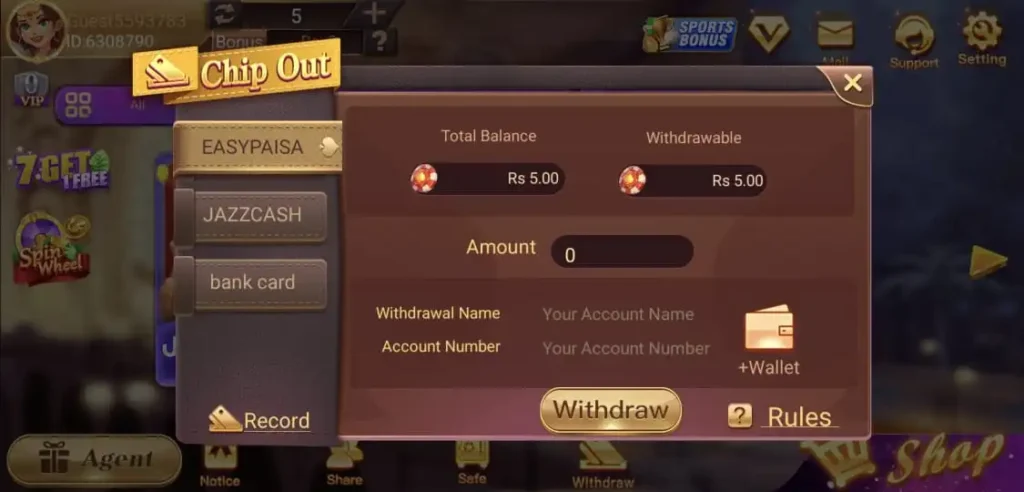
Step 2: Press the “Withdraw” icon. It should appear at the top part of your app, above your games.
Step 3: If you are making a withdrawal for the first time, you will have to connect your payment wallet. Press the “+ Wallet” icon to add an additional account.
Step 4: Pick a withdrawal method — EasyPaisa or JazzCash.
Step 5: Input the necessary information: account holder’s name (has to match your wallet), your phone account number, and choose a six-digit security password to use each time you withdraw.
Step 6: Click “Save” to associate your wallet to your Card Rummy account.
Step 7: Once you have associated your wallet, input the amount of money you would like to withdraw.
Step 8: Press the “Withdraw” button. After you submit the request, your money will be deposited to your EasyPaisa or JazzCash wallet. This will happen according to the normal transaction times.
In general, most transactions are completed very fast. However, there could be slight delays due to the speed of the payment processor. There could be some delay during the peak hours, but we normally don’t have problems with withdrawals.
Minimum Withdrawal Amount
The minimum withdrawal limit on Card Rummy has been established to ensure that you can withdraw the money when you have enough. However, the actual minimum may vary with respect to the current setting of the app. Therefore, we suggest that you check the withdrawal section in the app for the latest information.
Important Tips to Make Sure Withdrawals Are Smooth
Please make sure that the name on your Card Rummy account matches the name on your EasyPaisa or JazzCash wallet. Incorrect information is the primary cause for withdrawing money to be delayed or declined.
Always verify your mobile phone number prior to submitting a withdrawal request. Once the money is deposited, it cannot be moved to another account.
Please keep your 6-digit withdrawal password secure. Every time you make a withdrawal, you will be asked for it. If you forget it, contact our customer service department.
If you encounter an issue while attempting to make a withdrawal, please capture a screenshot of the error message and contact our customer service team using the “Support” icon located in the main game lobby. They will help you as soon as possible.
Deposit and Withdrawal Fees
To be honest, we do not charge any fees to deposit money to your account or to withdraw money from your account. The amount you deposit is the amount you receive as game chips, and the amount you withdraw is the amount that will be deposited into your wallet.
However, it is worth noting that EasyPaisa and JazzCash may have service fees or transfer fees that depend on the type of account you have and the amount that you are transferring. These fees, if applicable, are established by the payment processors and are outside of our control. Please check with your payment processor if you have any questions regarding their fee structure.
Common Problems When Depositing or Withdrawing Funds in Card Rummy
While we’ve developed a seamless payment system, some players experience difficulties. Below are the most typical problems you may encounter while attempting to deposit/withdraw and how to resolve these issues:
“Transaction Failed” During Deposit
The majority of times when you see “transaction failed” it’s due to either low available balance in your EasyPaisa/JazzCash wallet or a temporary network failure. Check to ensure you have sufficient balance in your wallet and a reliable internet connection, then try again. In case the issue persists, please allow a few minutes and retry the deposit once again.
Chips Not Credited After Deposit
On occasion, there could be a minimal delay (between 5 to 10 minutes) before the transaction is finalized and the chips display in your game wallet. If after waiting the specified timeframe, no chips appear, capture a screen shot of your payment confirmation and reach out to us right away. Support will verify the transaction and manually add the chips to your account as required.
Withdrawal Request Pending for Too Long
In general, all withdrawals should be processed relatively quickly; however, during high traffic periods, minor delays can occur. If your withdrawal has been in a pending status for longer than would normally be expected, please contact support with your User ID along with details of your withdrawal. Our staff will review and resolve the issue.
“Account Name Mismatch” Error
A mismatch in the name you entered in the Card Rummy application vs. your account name as it appears on your EasyPaisa/JazzCash account causes this error. To rectify this, go to the application settings for your wallet, update the account holder name to precisely mirror your registered EasyPaisa/JazzCash account name and then try again.
Unable to Link Wallet
If you’re unable to add your EasyPaisa/JazzCash account to your Card Rummy wallet, check that you’ve provided your mobile number accurately and that your wallet is active and validated. Any unvalidated or inactive accounts may not function properly with Card Rummy.
Security of Your Transactions
We take each and every transaction made on Card Rummy very seriously. All transactions (deposits/withdrawals) are processed over secure and encrypted channels in order to safeguard your sensitive personal financial data. As such, we do not save your wallet pin/password. The six-digit password you establish at the time you bind your wallet to Card Rummy is unique to Card Rummy and completely separate from your actual wallet pin/password.
Additionally, we utilize internal fraud detection tools to track each transaction and monitor for any suspicious activity. These tools assist in protecting our users against unauthorized access to their accounts and prevent unauthorized access to their earned balances stored on our website.
If you see a transaction on your Card Rummy account that you didn’t approve of, contact our support team. We’ll suspend your account until we can verify what occurred and complete the necessary actions to ensure your money remains safe.
Frequently Asked Questions About Deposits & Withdrawals
Q: Can I use both EasyPaisa and JazzCash on the same account?
Yes. You can connect as many wallets as you want to your Card Rummy account, and use either one when you make a transaction.
Q: Is there a daily withdrawal limit?
The amount of money you can withdraw per day will depend on what your account level is and/or whether you have VIP status. You can find the most up-to-date information about how much you can withdraw by checking the “Withdrawal” area of the app.
Q: Is there a daily withdrawal limit?
Yes. Your deposit method and your withdrawal method don’t have to match. For example, you could deposit money using Jazz Cash and then withdraw the money back to Easy Paisa, and vice versa.
Q: How long does a withdrawal take?
Most of the time, you’ll see your money in your bank account or e-wallet within a few minutes to an hour or two after you request to withdraw it. However, during peak usage times, this process may take longer. If it has been more than 24 hours since you requested the withdrawal, please reach out to us so we can help you.
Q: Do I need to verify my account before withdrawing?
Yes, you will need to link your email address to your Card Rummy account before you can make your first withdrawal. This is a safety measure to protect your money.
Start Playing Today
The deposit and withdrawal system of Card Rummy has been made quick, easy, and safe for all of our Pakistani players. Whether you want to deposit Rs. 20 in order to play a new game, or withdraw your winnings when you’ve had an excellent gaming session, it should take no longer than a few minutes. If at any time you experience some problem with the process of making deposits or withdrawals, please don’t hesitate to contact us. Our customer service representatives will help you immediately — we are available 24 hours each day.
Ready to get started with Card Rummy? Get the Card Rummy APK downloaded from our website right now and begin to make your first deposit.